
VIN Scanner
VIN ScannerAuto & Vehicles
3.8193.00 Reviews
- Version
- 3.2.4
- Installs
- 100.00K
- Age Rating
- Everyone
Screenshots
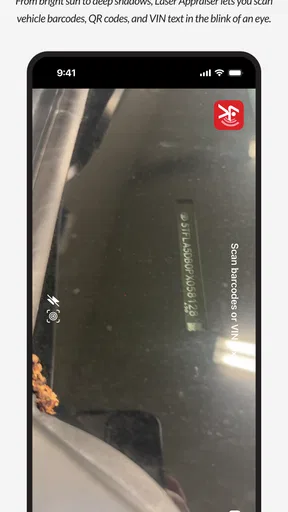
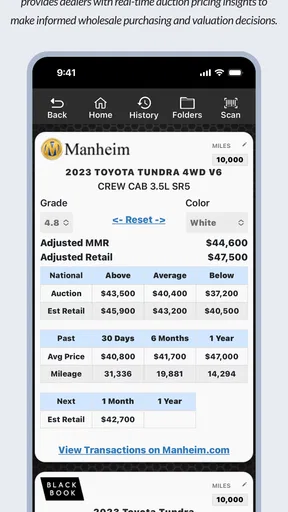
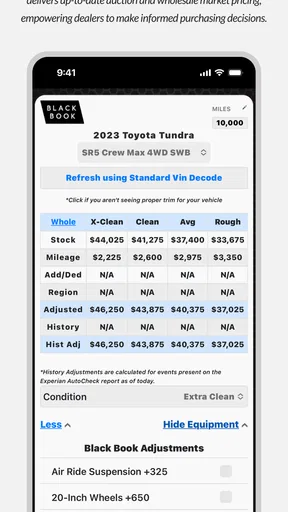
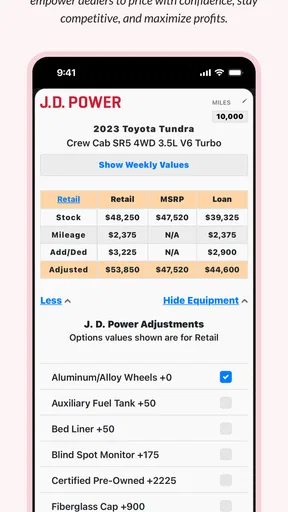
Our Review of VIN Scanner
 Analysis by Appyee
When I look at a used vehicle, I want the first check to be quick, repeatable, and less dependent on a seller’s description. VIN Scanner takes that first step and turns the vehicle identification number into the starting point for an appraisal workflow. That sounds simple, but it matters: a correct VIN gives every later decision a better foundation, whether I am checking a car for myself, preparing a run list, or comparing a possible purchase with the wider market.
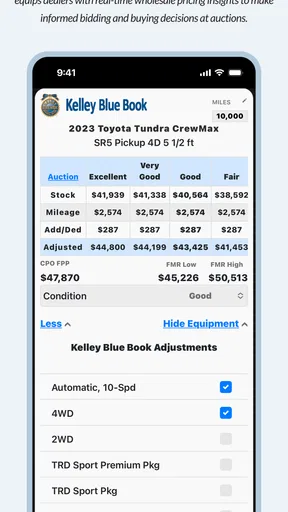
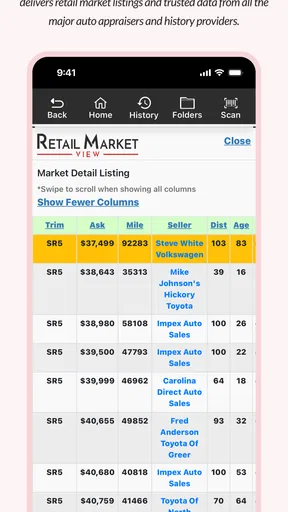
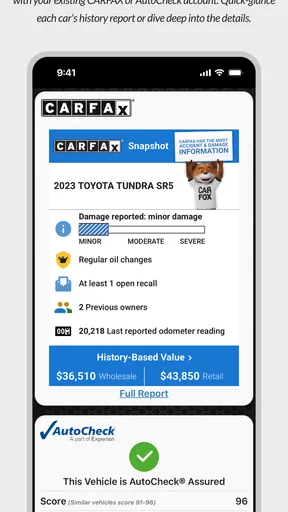
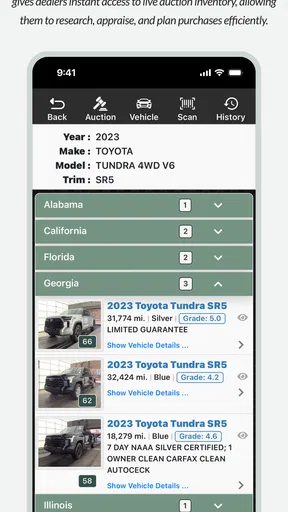
This is a free Android app in the Auto & Vehicles category from VIN Scanner. It is aimed less at casual browsing and more at people who regularly evaluate vehicles. The store summary presents it as a professional tool for auto appraisals, run lists, market insights, and profit, and that positioning matches my overall impression. It is not trying to be an entertainment app or a general driving companion. Its value comes from helping turn vehicle details into a more organized buying and selling process.
The app has been available since May 19, 2010, and its current version is 3.2.4. It is suitable for Everyone and works on Android 7.0 or later. With a 3.6 average from around 565 ratings and more than 100K installs, it has clearly found a practical audience, although the rating also suggests that the experience will not be perfect for every user or every phone.
Why the VIN is the useful center of the workflow
The strongest idea here is not simply scanning a code. It is using the VIN as an anchor for an appraisal. When I inspect a vehicle, the VIN is more dependable than a model name typed from memory, a handwritten listing, or a seller’s abbreviated description. Starting with that identifier reduces the chance of evaluating the wrong trim, year, or vehicle record.
That makes the app especially relevant when several cars look similar. On a busy lot, in a dealer’s inventory, or while reviewing auction vehicles, small identification mistakes can lead to bad comparisons. A VIN-based process gives each vehicle a consistent starting point, which is more useful than keeping loose notes that may later be attached to the wrong car.
The practical effect is that appraisal becomes a sequence rather than a collection of guesses. I can begin with identification, move toward the vehicle’s place in a run list, consider market context, and then think about whether the numbers leave room for profit. The app’s professional focus is most convincing when used this way. Its purpose is not just to tell me what a vehicle is; it helps frame the question of what that vehicle may be worth in a buying or selling workflow.
One subtle benefit is consistency. Even if I already know a lot about cars, I can become careless when moving quickly. A repeatable VIN-first habit helps prevent the common mistake of relying on a listing title or visual similarity. For a small operation, that consistency can be more valuable than a flashy interface because it protects the early stage of the decision.
Using the scanner as an appraisal starting point
I would treat the scan as the beginning of the investigation, not the final verdict. A vehicle identifier can organize the appraisal, but it cannot replace a physical inspection, a test drive, or a careful look at maintenance and damage. The best use is to combine the app’s identification workflow with what I see in front of me.
For example, if a seller describes a vehicle as a particular trim, I would scan the VIN before building a price opinion around that claim. If the vehicle’s visible equipment does not match the expected configuration, that discrepancy becomes something to investigate rather than something to ignore. This is one of the most useful habits the app encourages: verify the starting point before spending time on the conclusion.
I also find the run-list angle important. A person evaluating multiple vehicles needs more than isolated lookups. The useful question is often, “Which of these deserves my attention first?” A VIN-centered record can make it easier to separate candidates, compare them in a common process, and avoid letting the most attractive photograph dominate the decision.
That workflow is particularly helpful for buyers who are tempted to make quick offers. Instead of reacting to a low asking price, I would first identify the vehicle, place it in context, and then account for inspection findings, likely preparation, and resale potential. The app does not remove judgment; it gives judgment a more orderly place to start.
What a realistic buying session looks like
Imagine I am looking at several used cars during one afternoon. The first vehicle has a convincing listing and a seller who is eager to close quickly. The second is less attractive in photos but appears better maintained. The third has a price that looks unusually low. Rather than writing down only the advertised model and price, I would use the VIN workflow on each vehicle before comparing them.
That simple change improves the session in three ways. First, I have a more reliable identity for each candidate. Second, I can keep the candidates in a run-list style order instead of mixing notes from different cars. Third, I can think about market position and profit after the vehicles are correctly separated, rather than letting the cheapest headline price control the discussion.
The non-obvious advantage is that this also helps with rejected vehicles. A car that fails an early check should not continue consuming attention simply because it looked promising at first. Marking it mentally as a poor candidate and moving to the next VIN keeps the process efficient. For someone evaluating inventory, saving time on bad prospects can matter as much as finding a good one.
I would still verify every important detail independently before committing money. The app is useful for organizing the decision, but the final choice should include title status, physical condition, service evidence, outstanding mechanical concerns, and local market realities. A clean digital starting point is valuable; it is not permission to skip due diligence.
Where market insight and profit thinking fit
The app’s market and profit emphasis is most useful when I stop thinking of a vehicle’s price as a single number. A purchase price is only one part of the calculation. Preparation, transport, inspection findings, time on the lot, and the realistic selling price all affect whether a deal makes sense.
That is why I would use the app before making an offer, not after. Once I know which vehicle I am evaluating, I can ask better questions: Is the apparent discount real? Is the vehicle likely to need work that changes the margin? Is the market strong enough to justify holding it? Does the candidate belong on the run list at all?
This approach is more disciplined than relying on a generic classified-app search. Classified platforms are usually better for discovering listings and contacting sellers. A VIN-focused appraisal tool is better suited to the next stage, when I need to organize vehicle identity and think through the economics of a possible purchase. I would use the two types of tools together rather than expecting either one to do everything.
There is also a useful distinction between retail and professional use. A private buyer may only need one vehicle and may not care about building a repeatable run list. A dealer, reseller, or frequent evaluator has more to gain because small process improvements accumulate across many vehicles. The more often I repeat the appraisal cycle, the more valuable a consistent VIN-first habit becomes.
Tradeoffs I noticed during use
The professional focus is also the app’s main limitation. If I only want a broad ownership tool, fuel tracker, maintenance reminder, or casual vehicle reference, this is probably not the right choice. Its center of gravity is appraisal and vehicle evaluation, so users looking for a wider automotive dashboard may find the experience too narrow.
I would also avoid treating the app as a substitute for specialist inspection services. Scanning a VIN is fast, but a scan cannot reveal every problem that affects value. A worn transmission, repaired structural damage, neglected tires, or an intermittent electrical fault can change the economics of a purchase dramatically. The app can help me ask better questions, but it cannot answer every physical question about the vehicle.
Another tradeoff is that the usefulness of the result depends on how carefully I enter or capture the VIN. A single character error can send the appraisal in the wrong direction. I recommend checking the captured number against the vehicle itself before trusting the record, especially when the plate is dirty, poorly lit, or difficult to access. That extra pause is a small price for avoiding a much larger mistake.
The 3.6 average rating is a reasonable reminder to keep expectations measured. I would not install this expecting a flawless experience on every device or a complete replacement for all the tools used by professional appraisers. The app’s strongest value is narrower and more practical: it can make the identification and evaluation process more structured.
There is also a learning curve in deciding what to do with the information after the scan. A first-time user may expect the app to produce an immediate buy-or-skip answer. I think it works better when I use it as a checkpoint in my own process. Scan, verify, compare, inspect, calculate, and then decide. That sequence is less dramatic than an instant verdict, but it is much safer for real purchases.
Small workflow choices that improve the result
My first tip is to scan before discussing price in detail. Once a seller gives me a number, it is easy to anchor on it. Identifying the vehicle first helps me evaluate the candidate on its own terms before the asking price influences my expectations.
My second tip is to use the same order for every candidate. I would identify the vehicle, place it with the other vehicles under consideration, review the market angle, and only then estimate potential profit. Changing the order from one car to the next makes comparisons less reliable, especially when I am tired or moving between several locations.
My third tip is to record the reason a vehicle is rejected, not just the fact that it is rejected. A low margin, unclear identity, poor condition, or weak market position are different problems. Keeping that distinction helps me improve future buying decisions and prevents me from returning to a candidate simply because its price later looks attractive.
A fourth useful habit is to separate appraisal from inspection. I would use the app to establish the vehicle’s identity and organize the commercial question, then use a separate inspection checklist for condition. Mixing those tasks can create false confidence, while separating them makes it obvious which parts of the decision are supported by the app and which require direct evidence.
Who will get the most from it
VIN Scanner makes the most sense for used-car dealers, independent resellers, auction shoppers, and anyone who evaluates vehicles often enough to benefit from a repeatable process. It is also useful for a serious private buyer who is comparing several cars and wants to avoid relying entirely on listing descriptions.
For those users, the free price lowers the barrier to testing the workflow. The Everyone age rating also makes it broadly accessible, although the professional orientation means that not every user will find a reason to keep it installed. Someone who buys a vehicle only once and already has a trusted inspection and research routine may gain little from adding another step.
I would skip it if my main need is navigation, service scheduling, fuel tracking, or a general car-maintenance diary. I would also look elsewhere if I need a comprehensive valuation platform with a deeply specialized inspection system or a full dealership management environment. The app is more focused than that, and its value comes from that focus.
On the other hand, I would recommend trying it when the problem is disorganized vehicle evaluation. If I am juggling several candidates, uncertain about a listing’s identity, or trying to decide whether a possible purchase belongs on my run list, a VIN-led workflow is exactly the kind of structure that can prevent avoidable mistakes.
My final view after using the workflow
VIN Scanner is not the kind of app I would recommend because it promises to solve every part of buying and selling a vehicle. I recommend it for a more specific reason: it makes the VIN the first disciplined checkpoint in an appraisal process. That can improve how I compare cars, how I organize prospects, and how early I notice that a deal deserves more investigation.
The app is strongest when I use it alongside a physical inspection, independent research, and a realistic profit calculation. It is weaker when I expect one scan to deliver a complete buying decision or when I want a broad automotive utility. Those boundaries are important, but they do not cancel out the core usefulness.
With over 100K installs, a free entry point, support for Android 7.0 and later, and a long presence in the category, it is easy to try without committing money. My advice is to test it on the next group of vehicles you evaluate, not just one isolated car. That is where the run-list and comparison value becomes clearer. For frequent evaluators, it can become a practical first step; for occasional owners, it may be more specialized than necessary.
Overall, I see it as a focused tool for people who want fewer loose assumptions at the beginning of an automotive appraisal. It will not replace expertise, inspection, or careful financial judgment, but it can help those things work in a cleaner order. If that is the gap in your current process, VIN Scanner is worth a place in your toolkit.
Privacy and Permissions
See what permissions an app requests and how it handles your data.
- Photos/Media/Files
- read the contents of your USB storage, modify or delete the contents of your USB storage
- Storage
- read the contents of your USB storage, modify or delete the contents of your USB storage
- Camera
- take pictures and videos
- Other
- view network connections, full network access, control vibration, prevent device from sleeping
Verdict
Strengths of VIN Scanner
- Quickly identifies vehicles from VIN numbers.
- Useful for checking basic vehicle history before a purchase.
- Simple interface suitable for occasional users.
- Helps verify vehicle details against seller information.
- Convenient mobile access without specialized equipment.
Limitations of VIN Scanner
- Some reports may require an additional payment.
- Data availability can vary by country and vehicle age.
- Results may not include every accident or ownership event.
- VIN entry errors can lead to inaccurate vehicle information.
- Requires internet access for searches and report retrieval.
Similar Picks in This Category
View All
Android Auto
Google LLC4.1

maxim — order a taxi & food
PT. SITO4.7

Штрафы ГИБДД: проверка с фото
Pays LLC – Штрафы ГИБДД4.7

Номерограм – проверка авто
Авто Ассист4.8

Дром Авто
Дром4.9

Frequently Asked Questions
What is VIN Scanner and what can it do?
VIN Scanner is a mobile tool designed to read and interpret a vehicle identification number, commonly known as a VIN. After entering or scanning the 17-character code, the app can help display basic vehicle details such as the manufacturer, model information, production data, and identifying specifications. It is useful when checking a used car, organizing vehicle records, or confirming that the VIN matches the information provided by a seller.
How do I scan a VIN with the app?
To scan a VIN, open the app and allow access to your device’s camera if requested. Position the vehicle identification number inside the on-screen frame, usually from the dashboard, driver-side door label, or vehicle documents, and keep the camera steady. If the text is difficult to recognize because of glare, damage, or poor lighting, you can normally enter the VIN manually and submit it for decoding.
Does VIN Scanner provide complete vehicle history reports?
VIN Scanner primarily decodes the identification number and presents available vehicle information; it should not automatically be considered a complete history-report service. Details such as accidents, title problems, odometer records, theft reports, recalls, or maintenance history may require information from official agencies or third-party databases. Before purchasing a vehicle, use the app as an initial check and verify important findings through reliable independent sources.
Is VIN Scanner free to use, and are there in-app purchases?
The availability of free features, advertisements, subscriptions, or paid reports can vary depending on the version of VIN Scanner and the platform where it is downloaded. Basic VIN scanning or decoding may be available without payment, while expanded specifications or history-related information could require an upgrade. Review the store listing and the app’s payment screen carefully before confirming any purchase or recurring subscription.
Is VIN Scanner accurate and safe for buying a used car?
VIN Scanner can be a convenient way to read and decode a vehicle identification number, but its results should be treated as a reference rather than a final buying decision. Accuracy depends on the quality of the scan, the VIN entered, and the databases used by the app. Always compare the decoded information with the vehicle, registration documents, inspection records, and a professional mechanic’s evaluation before buying.
